Building sview: A Cardano Node Monitor Written with AI
We recently released sview, a terminal-based monitoring tool for Cardano nodes. What makes this project a bit different is that it was built almost entirely using AI coding agents. It started as a fun experiment, and turned into a genuinely useful tool that we now use daily to monitor our stake pool infrastructure.
What is sview?
sview is a TUI (terminal user interface) application written in Rust that connects to your Cardano node's Prometheus metrics endpoint and displays real-time operational data. It shows you everything you need to know about your node at a glance:
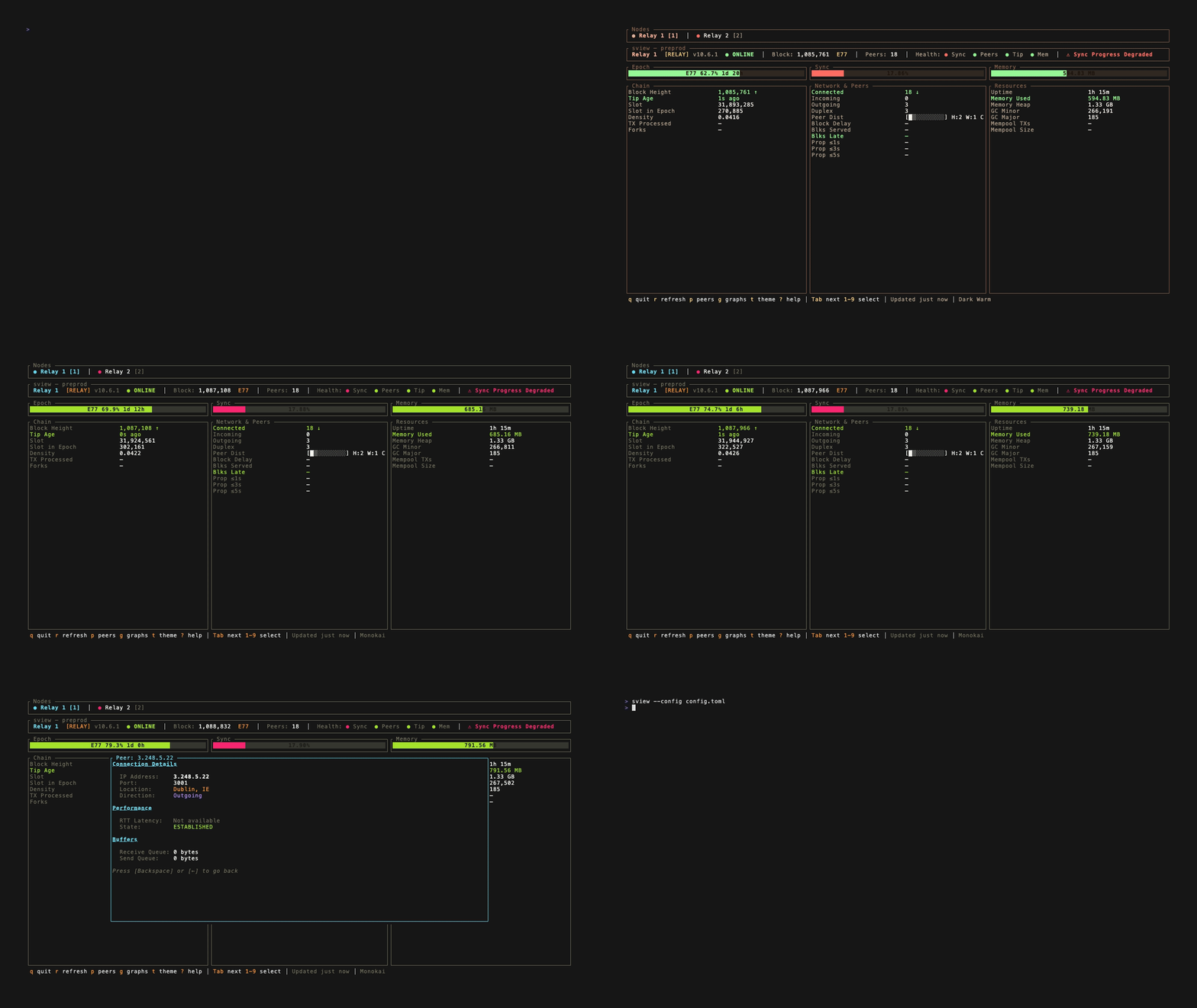
Here's what it monitors:
- Sync status and blockchain tip age
- Block propagation statistics with timing distributions
- Peer connections with latency and geolocation data
- Memory and resource usage with color-coded health indicators
- KES period and OpCert validation for block producers
- Historical graphs for tracking metrics over time
You can monitor multiple nodes simultaneously, switching between your relays and block producers with a single keypress. It works on Linux and macOS, ships as a single binary with no runtime dependencies, and includes eight color themes if you're particular about aesthetics.
The AI Experiment
I've been using AI for coding tasks on and off for a few years now. The early tools were useful for boilerplate, documentation, and simple code generation, but they required constant supervision and correction. You'd spend as much time fixing the AI's mistakes as you would have spent writing the code yourself.
My personal experience is that we've hit a turning point. The latest generation of models - particularly Claude 4.5 and agentic tools like Claude Code - have crossed a threshold where they can genuinely handle complex, multi-file projects with minimal hand-holding.
For sview, we used Claude Code as our primary development tool, combined with OpenClaw to put the AI into a continuous automatic development cycle. Our role was more like a product manager than a developer - we provided guidance and direction, but ultimately let the AI make most of the decisions for itself.
The AI did everything. It analysed the Cardano node source code to understand what metrics were available and how to interpret them. It designed the UI, chose the libraries, wrote the Rust code, and integrated with the ratatui framework. It periodically reviewed its own code, fixed bugs it found, and even suggested its own features and improvements. When it was happy with a change, it committed directly to the mainline and tagged its own releases. It even created all the CI pipelines and release automation.
We invested just a few hours of our time over the course of the project. Our involvement was mostly testing functionality against our production nodes and giving basic instructions to guide development in the direction we wanted. We did basic code reviews, but nothing deep - we were more interested in seeing what the AI could accomplish on its own.
The result is a tool that's usable and useful, though probably not as feature-rich or production-hardened as more established tools in the Cardano ecosystem like nview and gLiveView. But that wasn't really the point. This was an experiment in autonomous AI development, and on that front, it exceeded our expectations.
Why Rust?
Rust was a deliberate choice for this project. We wanted:
- A single, statically-linked binary that operators could drop onto any machine
- Minimal resource footprint - this runs alongside your node, not instead of it
- Strong guarantees about memory safety and thread correctness
- The excellent ratatui ecosystem for terminal UIs
Rust's strict compiler also proved to be a good match for AI-generated code. When the AI made mistakes, the compiler caught them. The type system acted as a safety net, preventing entire categories of bugs from making it into the final binary.
Open Source
We've made sview available as open source under the Apache-2.0 license. You can find it on GitHub:
github.com/sandstonepool/sview
Installation is straightforward:
# From pre-built releases
# Download from GitHub releases page

# From source via Cargo
cargo install --git https://github.com/sandstonepool/sview

# Or clone and build locally
git clone https://github.com/sandstonepool/sview
cd sview
cargo build --release
Then point it at your node's Prometheus endpoint:
sview --prom-host 192.168.1.100 --prom-port 12798 --node-name "My Relay"Or configure multiple nodes in ~/.config/sview/config.toml for monitoring your entire infrastructure from one terminal.
A Note on AI-Generated Code
We want to be transparent: this tool was built almost entirely by AI coding agents with minimal human code review. We use it ourselves to monitor our nodes, but we haven't audited the codebase in depth. The code is open source precisely so you can inspect it yourself before deciding whether to use it.
As with any monitoring tool, make sure your Prometheus endpoint isn't exposed to untrusted networks. sview only reads metrics - it doesn't make any changes to your node - but good security hygiene is always worthwhile.
Looking Forward
This was a really fun experiment. Building sview reinforced something I've been feeling for a while: AI coding tools have matured from "interesting novelty" to something genuinely capable of autonomous work. The ability to put an AI into a continuous development loop, step back, and let it build something useful with minimal intervention - that's a significant shift from where we were even a year ago.
We'll definitely continue experimenting with this approach on other projects, and we'll continue open-sourcing the results. If you're running a Cardano node and want to try sview, give it a go. And if you find bugs or have feature requests, open an issue on GitHub - or better yet, see if an AI can fix it for you.
Happy staking.